RAM stands for Random Access Memory. It is an essential hardware component in how a computer operates. Whether you are browsing the web, editing documents, playing games, or processing high-definition video, RAM affects how efficiently a device handles data and how smoothly it runs multiple tasks. RAM is a core form of internal memory that exchanges data directly with the processor. It provides high-speed storage space for the operating system, running programs, and temporary data.
How RAM Works
You can think of RAM as a computer’s “workbench.” A hard drive is like a “warehouse” where all your files are stored, while RAM is the desktop you are currently working at. When you work, the system moves the data it is about to use from the warehouse to the desktop, where the processor can access it easily. The more space the desktop has, the more files and tools you can keep there at once, which naturally improves efficiency. Computers work in a similar way. Programs and data are usually stored on a hard drive (the “warehouse” mentioned above). When a program runs, the parts it needs are loaded into RAM so the CPU and other hardware can access them quickly.
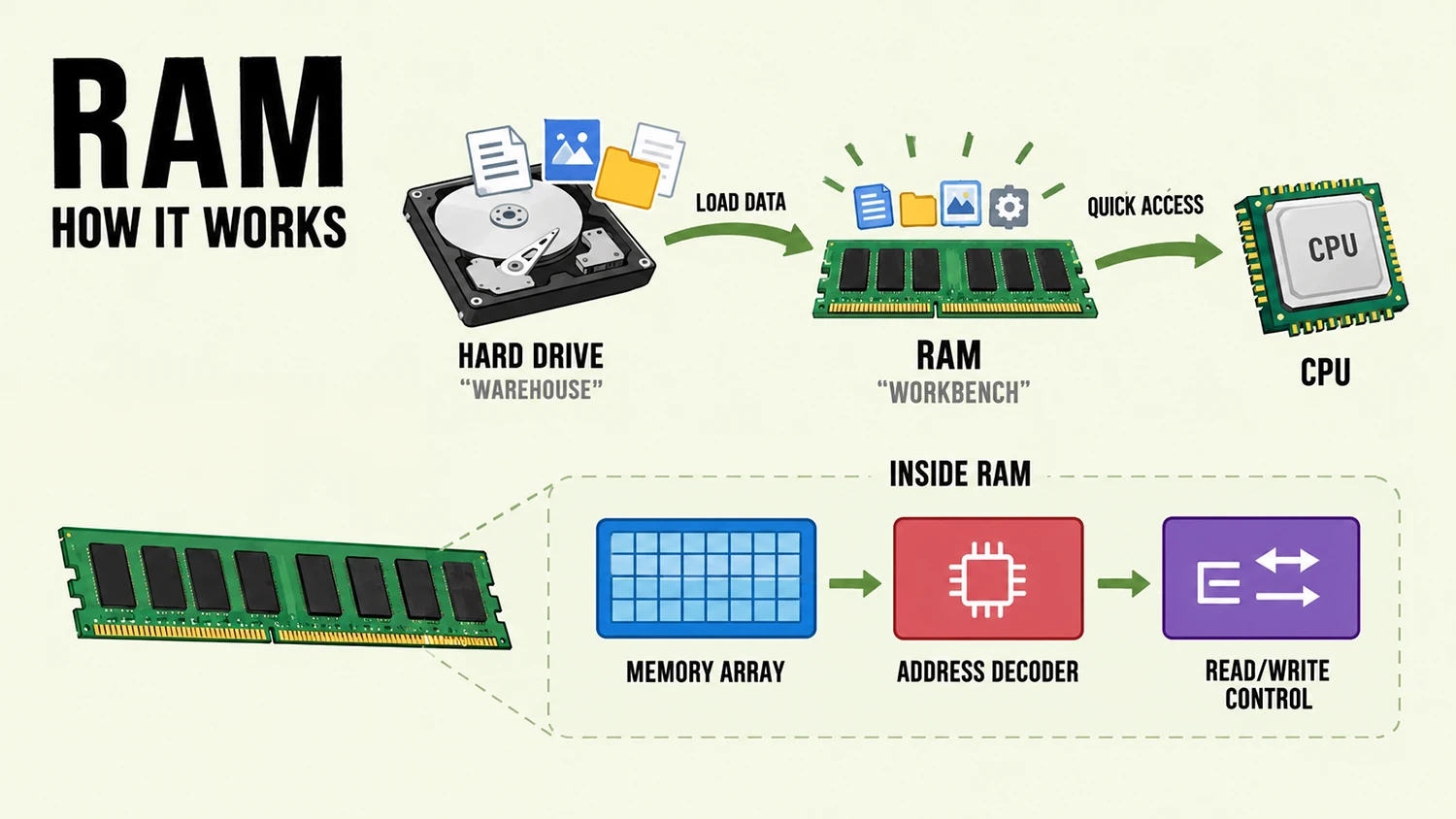
RAM mainly consists of three parts: a memory array, an address decoder, and read/write control circuitry. The memory array contains a large number of storage cells, each of which can store one bit of binary data. The address decoder receives address signals from the processor and identifies the target storage cell. The read/write control circuitry then writes or reads data according to the instructions. This entire process takes place extremely quickly, supporting billions of computer operations per second.
The Main Functions of RAM
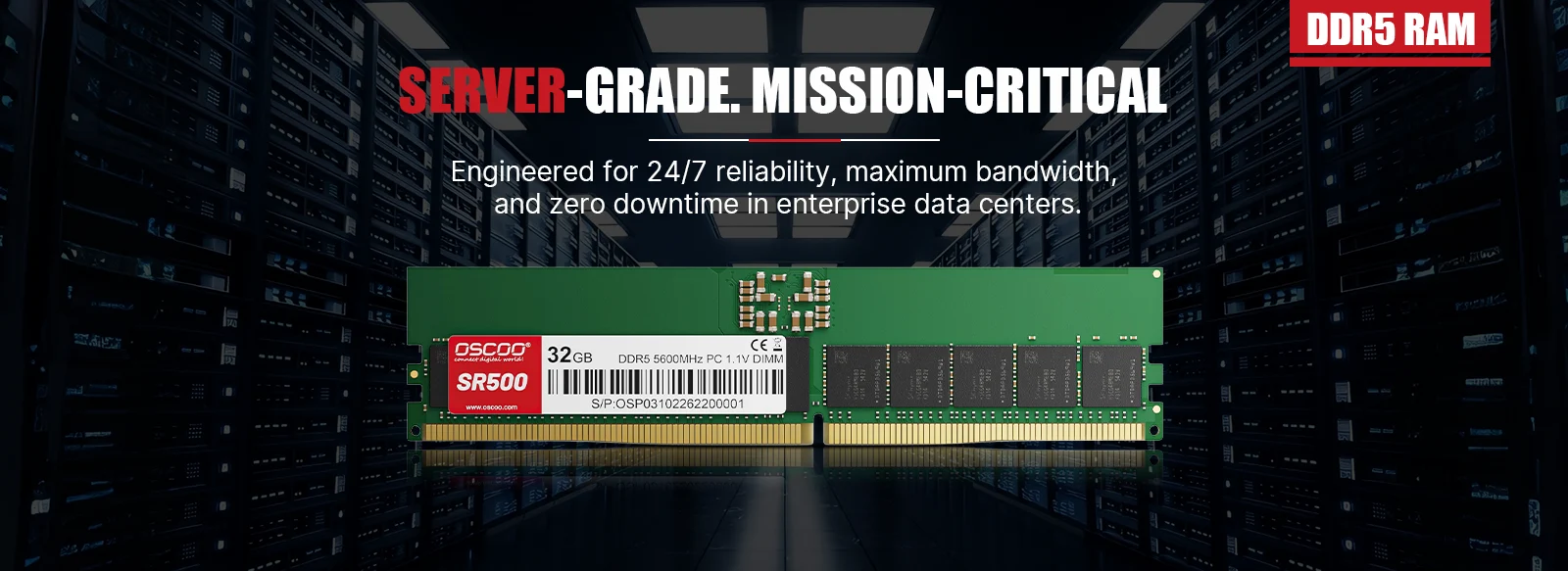
RAM’s main role is to provide temporary working space for running programs and the system. Its impact is not limited to whether a computer can run a particular program. It also affects the overall experience when several tasks run at the same time.
Supporting Applications
When you open a browser, office software, or an image-editing tool, the operating system loads the code and data needed to run the program into memory. While the program is running, RAM holds the information required for the current task. The CPU accesses this data through the memory system, executes program instructions, and performs the required operations. If there is not enough available memory, a program may fail to start properly or may run slowly.
Improving Multitasking
Modern computers usually run several programs and background services at the same time. For example, you might search for information in a browser, edit a document in Word, play music, and receive messages all at once. Each of these programs needs some memory. If there is enough RAM, the system can more easily keep the data needed by multiple tasks, reducing the need to frequently free up and reload data. Sufficient RAM is therefore especially important for users who often keep many browser tabs, office programs, and other apps open at once.
Supporting Gaming and Graphics Processing
Computer games need to process scene information, character states, game logic, and other runtime data. Some of this data is stored in system RAM, while graphics-related data may use dedicated video memory or shared system memory. Video-editing, 3D-modeling, and large image-editing applications also need plenty of working space. As video resolution, project size, and the number of assets increase, memory requirements may rise as well.
Keep in mind that the performance of games and graphics applications depends on more than RAM. It is also affected by the CPU, GPU, video memory, storage devices, software optimization, and other factors.
Key Characteristics of RAM
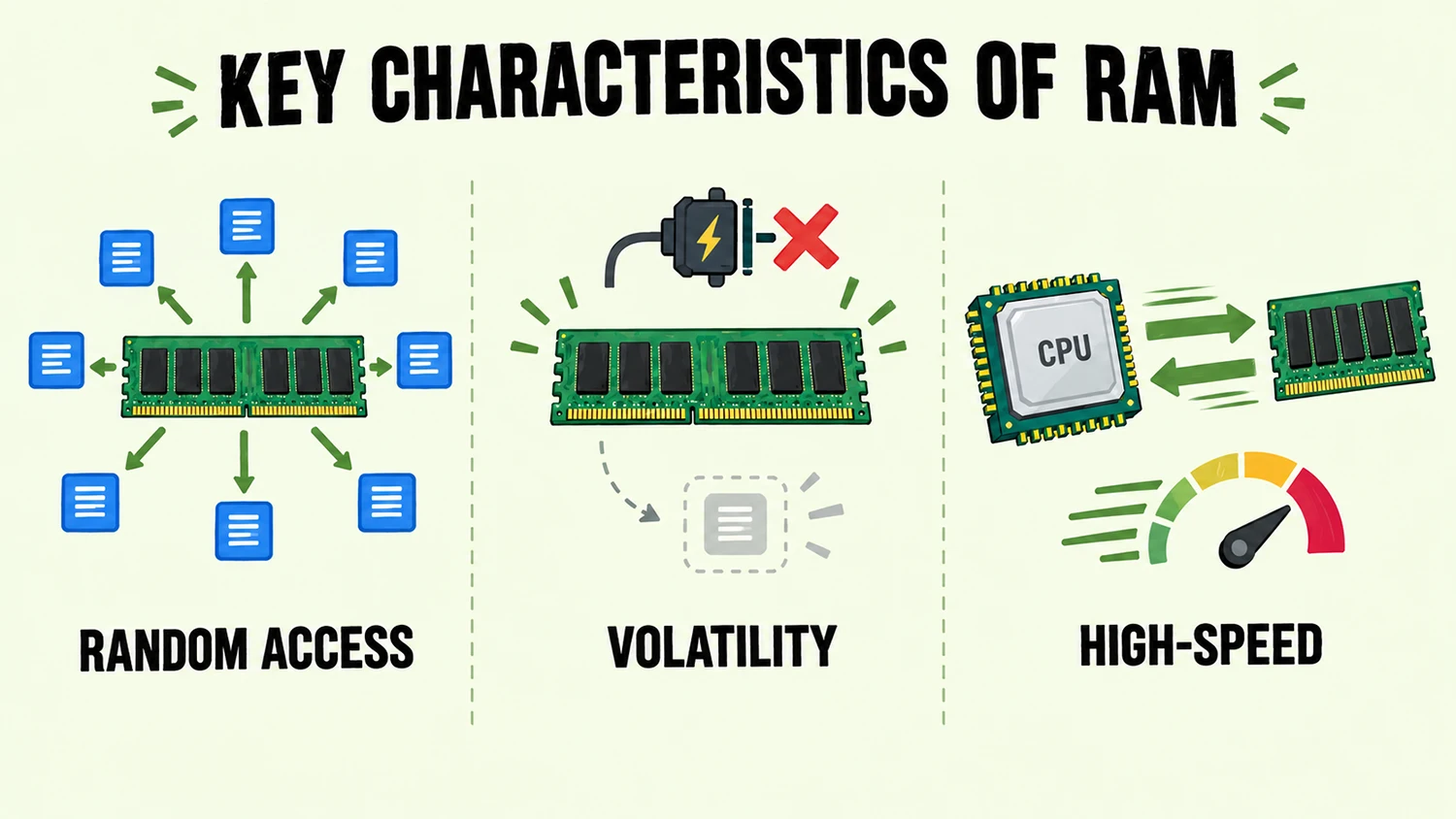
Random Access. Random access is RAM’s defining characteristic. In simple terms, the time a processor takes to read or write data at any address in memory is roughly the same, regardless of the data’s physical location. This clearly distinguishes RAM from sequential-access storage devices such as tape and hard drives. It is also one reason memory can support real-time computing.
Volatility. Volatility is one of RAM’s most important characteristics. Memory must remain powered to retain its data. Once the power is cut, the computer is shut down, or the system restarts, all content stored in RAM is cleared and cannot be recovered. This is why you should save documents to a storage drive regularly. Unsaved content exists only in memory and will be lost if the power goes out unexpectedly.
High-Speed Read and Write. RAM reads and writes data much faster than solid-state drives and hard disk drives. Current mainstream DDR5 memory can provide read bandwidth of tens of GB per second, with access latency as low as a few nanoseconds, keeping pace with the processor’s high-speed operations. By comparison, even the fastest SSDs are more than an order of magnitude slower, and their latency can be hundreds of times higher.
Main Types of RAM
Based on how their storage cells work, RAM is mainly divided into two categories: Static Random Access Memory and Dynamic Random Access Memory. The two differ significantly in their characteristics and uses.
SRAM
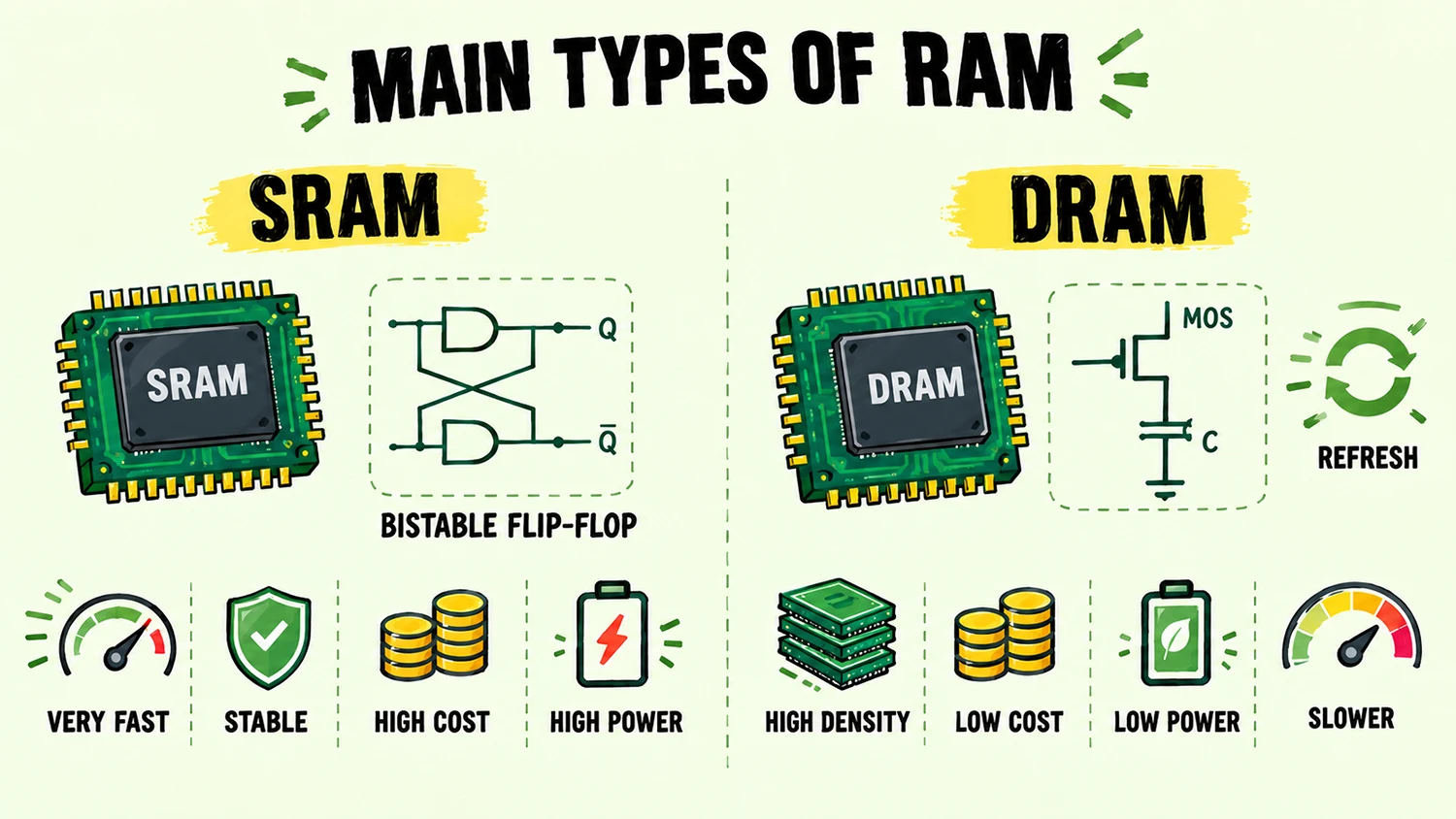
SRAM stands for Static Random Access Memory. Its basic storage unit is a bistable flip-flop circuit. The circuit’s stable state holds the data, and the data remains stored as long as power is supplied. It does not need periodic refreshing, which is why it is called “static.”
SRAM offers extremely fast access, reaching speeds of a few nanoseconds, and it is highly stable. However, it has a lower integration density, a high cost per unit of capacity, and higher power consumption. As a result, SRAM is not used for large-capacity main memory. It is mainly used where very high speed is essential but capacity requirements are small, such as in a processor’s cache.
DRAM
DRAM stands for Dynamic Random Access Memory. It stores data as electrical charge in the gate capacitance of MOS transistors. Because capacitors naturally lose charge, the charge must be replenished regularly every few milliseconds through a process called refreshing. Otherwise, the data will be lost. This is why it is called “dynamic.”
DRAM has a much higher integration density than SRAM, a lower cost per unit of capacity, and better power efficiency. It is the mainstream solution for large-capacity memory today. Its disadvantages are that it requires refresh circuitry and is slower to access than SRAM. The computer memory and smartphone RAM we commonly refer to are essentially DRAM. DRAM has also developed into several types for different uses:
- DDR SDRAM: Double Data Rate Synchronous Dynamic Random Access Memory. It is the mainstream type of memory used in desktop computers, workstations, and servers. DDR4 and DDR5 are the main generations on the market today. They increase data-transfer bandwidth by improving transfer rates and bus width.
- LPDDR: Low-Power DDR, optimized for mobile devices such as smartphones, tablets, and thin-and-light laptops. It reduces power consumption significantly by lowering operating voltage while balancing size and performance. LPDDR5X is the latest standard, and the next generation, LPDDR6, has entered preparations for mass production.
- GDDR: Graphics DDR, a type of high-bandwidth video memory designed specifically for graphics cards. It is optimized for the high throughput required by graphics rendering. GDDR6 and GDDR6X are currently common versions.
- HBM: High Bandwidth Memory. It uses 3D stacking technology to achieve extremely high bandwidth density and is mainly used in high-end graphics cards and AI accelerator chips.
Key Parameters of RAM
Capacity. Memory capacity is measured in GB. Common consumer capacities include 8GB, 16GB, 32GB, and 64GB, while server memory can reach the terabyte range. Capacity affects how many programs a device can run at once and how smoothly it handles large applications. When RAM is insufficient, the system uses storage-drive space as virtual memory. Because storage drives are much slower than RAM, this can greatly reduce performance and cause noticeable lag.
Frequency and Data Transfer Rate. Frequency refers to the actual operating clock frequency inside the memory chips. It determines the memory’s basic operating rhythm and is measured in MHz. The data transfer rate is usually measured in MT/s, or millions of transfers per second. Thanks to DDR technology, which transfers data twice per clock cycle, memory can transfer data on both the rising and falling edges of a clock cycle. The data transfer rate is therefore twice the core clock frequency. For example, DDR5-6400 has a core operating frequency of 3200 MHz and an effective transfer rate of 6400 MT/s. A higher transfer rate can provide greater potential memory bandwidth, but actual performance gains also depend on the processor, memory controller, motherboard, and specific applications.
Timings. Memory timings are commonly represented by the CL value. This indicates the number of clock cycles between the memory receiving a command and the data being output. A lower value means lower latency. However, comparing CL values directly across different memory generations is not very meaningful. The data transfer rate should also be considered when evaluating actual latency. For products within the same generation, transfer rate and timings need to be balanced. A higher frequency does not always deliver a better experience.
Memory Channels. Memory configurations include single-channel, dual-channel, and quad-channel setups. Multi-channel technology can multiply memory bandwidth. Most consumer platforms support dual-channel memory, while servers and high-end workstations support quad-channel or more. When setting up dual-channel memory, it is recommended to use memory modules with the same specifications and from the same production batch to ensure the best compatibility and performance.
The Latest Developments and Future Trends
DDR5 Continues to Spread and Improve in Performance
DDR5 has reached maturity. Mainstream desktop memory transfer rates are moving from 5600 MT/s toward 6400 MT/s and higher, while high-end overclocked memory has already exceeded 8000 MT/s. DDR5 memory for servers is advancing even faster. Micron has introduced a 256GB DDR5 server memory sample with a transfer rate of 9200 MT/s. It is more than 40% faster than current mass-produced products while using 40% less power. In terms of capacity per module, 128GB DDR5 modules are now available for desktops, while server modules have reached 256GB or more.
Mobile Memory Enters the LPDDR6 Era
LPDDR6 technology for mobile devices has matured, and manufacturers such as SK hynix plan to begin mass production in the second half of 2026. Compared with the previous generation, LPDDR5X, LPDDR6 is expected to improve data-processing speed by 33% and reduce power consumption by more than 20%. It is designed mainly for on-device AI and high-performance mobile computing. As AI applications on smartphones become more widespread, high-bandwidth, low-power memory is becoming increasingly important.
The Next Generation, DDR6, Is Taking Shape
According to technology roadmaps published by manufacturers, DDR6 is expected to launch around 2027. Its bandwidth is expected to be more than twice that of DDR5, and a single memory module could offer a capacity of up to 1TB. DDR6 will use more advanced manufacturing processes and architectural designs for AI data centers and high-performance computing.
Exploring New Memory Technologies
The industry is also exploring next-generation memory technologies, such as MRAM (magnetoresistive random-access memory) and PCRAM (phase-change random-access memory). These technologies may offer both high-speed read/write performance and data retention without power, overcoming the volatility limitation of traditional DRAM. However, they are still at an early stage of development and remain some distance from large-scale commercial use.
Memory Buying Recommendations
More memory is not always better. Choosing the right capacity and specifications helps balance user experience and value for money. The following recommendations are a guide for different use cases:
- Everyday Office Work and Light Use. 8GB is the basic entry-level minimum. It can handle basic office tasks, web browsing, and video playback, but the system may lag when several programs are open. For people buying a new computer, 16GB is the mainstream starting point today. It can handle everyday office work, social apps, and several ordinary browser tabs smoothly, meeting the needs of most general users.
- Gaming and Content Creation. 32GB is the recommended configuration for gamers and content creators. Mainstream AAA games commonly use 10GB to 16GB of memory. With background system usage added, 16GB may only just be enough. 32GB provides more headroom, helping games run smoothly while leaving chat apps and browser tabs open in the background. For creators who edit video, work with 3D models, or process images, 32GB is also a basic requirement.
- Professional Workloads and AI Applications. Capacities of 64GB or more are suitable for users who work with professional workstations, run multiple virtual machines, or run large AI models locally. As generative AI becomes more common, running large language models locally requires more memory. A 7B-parameter model typically needs more than 16GB of memory, while a 13B model needs more than 32GB. Larger models may require 64GB or more. In these scenarios, memory capacity is the top priority.