SSDs do experience performance changes with use, but most of the slowdown people notice in daily use is not caused by hardware aging. Most performance loss comes from reversible factors such as insufficient disk space, exhausted SLC cache, or improper system settings, rather than physical wear of the flash memory. Performance degradation caused by actual flash aging usually becomes noticeable only near the end of an SSD’s service life. In normal home use, it is almost impossible to notice within five to ten years. With proper use and settings, an SSD can maintain stable performance for a long time.
The Underlying Logic Behind SSD Performance Changes
To understand why SSD performance changes, we first need to understand a key physical characteristic of NAND flash memory: unlike a mechanical hard drive, it cannot directly overwrite old data. The corresponding storage cells must first be erased before new data can be written. Flash memory cells have a clear hierarchy. The smallest unit for writing is called a page, usually 4KB to 16KB in size. The smallest unit for erasing is called a block, which is generally made up of 64 to 256 pages, with a capacity of 256KB to 4MB. When a user modifies a small file, the SSD cannot directly overwrite the original data page. It can only write the new data to an empty page and mark the old data page as invalid.

When there are not enough empty blocks, the SSD’s controller needs to perform garbage collection: it selects storage blocks containing a large number of invalid pages, copies the data that is still valid to new empty blocks, and then completely erases the old blocks to free up space. During this process, one logical write at the user level can trigger multiple physical read and write operations inside the SSD. This phenomenon is called write amplification. On a brand-new empty drive, there are plenty of empty blocks, so the write amplification factor is close to 1. When disk space becomes limited and data is scattered, the write amplification factor can increase to several times or even more than ten times, directly causing a large increase in write latency.
The Most Common Reversible Performance Degradation
In daily use, most SSD slowdowns that users can actually notice are not caused by hardware aging. They are normal phenomena under certain usage conditions and can be restored to the original performance after adjustment.
The Impact of the SLC Cache Mechanism
Most mainstream consumer SSDs currently use TLC or QLC flash memory. The native write speed of these types of flash memory is not particularly high. TLC has a native write speed of about 500 to 1500MB per second, while QLC is even slower. To improve the experience during daily use, manufacturers temporarily use part of the flash memory space as single-bit SLC mode, known as the SLC cache. Its write speed can reach the advertised high-speed level.
When the size of the files being written is smaller than the cache capacity, the data is quickly written to the cache area, and users can experience the advertised high-speed performance. When the amount of continuous writing exceeds the cache limit, however, the data can only be written directly to the native TLC or QLC area, and the speed will drop sharply. Most consumer SSDs use a dynamic SLC cache design. The more free space remaining on the drive, the more cache capacity can be used. When disk usage exceeds 70%, the available cache can shrink significantly, and the drop in continuous write speed will occur earlier.
Performance Loss Caused by Insufficient Free Space
Insufficient free space is the most important factor causing SSDs to become slower during daily use. When the remaining free space falls below 15% to 20%, the number of empty blocks that the controller can manage becomes seriously insufficient. Garbage collection can no longer be completed quietly during idle periods and instead has to run at the same time as user write operations. This is called passive garbage collection.
At this point, a large amount of the controller’s computing resources is occupied by moving data, and the write amplification factor rises sharply. When the user writes 1GB of logical data, the SSD may need to move several GB of valid data internally. This not only directly reduces write speed, but also consumes additional flash write/erase endurance. Entry-level SSDs with less reserved space will show more obvious performance degradation at high usage rates.
Thermal Throttling
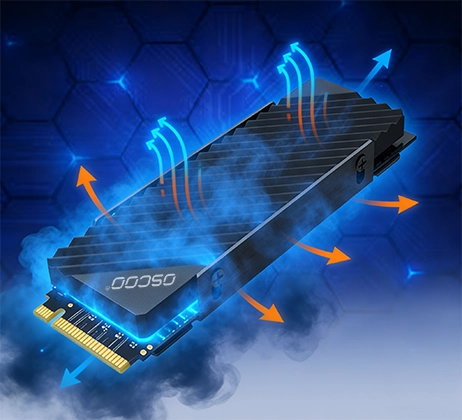
For newer PCIe 4.0 and PCIe 5.0 SSDs, the power consumption and heat generation of the controller have increased significantly compared with previous generations. During continuous high-load read and write operations, the SSD’s core temperature can easily exceed the threshold of 75°C to 85°C. To prevent the chip from overheating and being damaged, the controller automatically reduces its operating frequency to control the temperature. This is called thermal throttling, and read and write speeds will drop significantly at this time.
This speed reduction is completely reversible. Once the temperature falls back into the safe range, performance will immediately return. Adding a heatsink to the SSD and maintaining good airflow inside the computer case can both effectively reduce performance fluctuations caused by thermal throttling.
Interference Caused by Improper System Settings
Some operating system settings can also create the impression that an SSD has become slower. The TRIM command is an important system feature for SSDs. After a user deletes a file, it promptly informs the SSD that the corresponding data pages are no longer valid, allowing the controller to perform erasing and garbage collection in advance. If the TRIM command is not enabled properly, the efficiency of garbage collection will drop significantly, and write performance may gradually decline after long-term use. In addition, enabling disk write caching and avoiding old disk tools that do not support TRIM can make the actual SSD experience smoother.
Changes Caused by Actual Physical Aging
As the number of write/erase cycles accumulates, flash memory cells undergo irreversible physical degradation. This is what truly causes an SSD to become slower due to aging, but the threshold at which this change can be noticed is very high.
Increased ECC Correction Overhead
Every write/erase operation causes small amounts of physical damage to the oxide layer of the flash memory cells. As the number of P/E cycles increases, the electron tunneling effect of the flash cells gradually becomes weaker, the threshold voltage distribution of the cells becomes wider, and the raw bit error rate when reading data increases approximately linearly.
The ECC error-checking and correction engine built into the SSD is responsible for correcting bit errors that occur during reading. As the error rate increases, the ECC engine needs more computing resources and time to complete error correction, so read latency gradually increases. Mainstream TLC SSDs currently generally use LDPC error-correction codes, which provide strong error-correction capability. During the middle stage of the SSD’s life, the increase in error-correction overhead is very slow and is almost impossible to notice during daily use.
Increase in Bad Blocks and Consumption of Over-Provisioned Space
Flash memory chips already contain a small number of initial bad blocks when they leave the factory, and new bad blocks continue to appear during use. The SSD controller uses spare blocks from the over-provisioned space to replace damaged blocks, keeping the user’s available capacity unchanged.
When the number of bad blocks accumulates to a certain level, the spare blocks gradually run out. The over-provisioned space originally used for garbage collection and wear leveling becomes reduced, leaving the controller with less operating space and indirectly causing performance degradation. When the number of bad blocks exceeds a safety threshold, the SSD enters read-only protection mode and prevents further writing to avoid data loss.
Reduced Data Retention Capability
Aging flash memory cells become less capable of holding electrons, and the rate of electron leakage increases, shortening the time for which data can be retained. To maintain data reliability, the controller performs data refreshes and read verification more frequently, increasing background read and write activity and indirectly affecting foreground performance.
For normal home use, the daily amount of data written is usually around 10 to 30GB. Taking a mainstream 1TB TLC SSD as an example, its rated endurance is usually around 600TBW. At 30GB of writes per day, its theoretical lifespan can reach several decades. During the first 70% to 80% of its lifespan, performance degradation caused by physical aging is extremely small. Only professional benchmark tests can detect the difference, and it is almost impossible to notice during daily use.
Reference for Performance Changes at Different Stages
SSDs have clear performance characteristics at different stages of use, as shown in the table below:
| Usage Phase | Performance Characteristics | Dominant Factors |
|---|---|---|
| Brand‑new empty drive | Peak performance, write amplification near 1 | Ample free blocks, largest SLC cache |
| Normal use (below 70% capacity) | Stable overall, minor fluctuations | Regular garbage collection, dynamic cache working normally |
| High capacity (above 85% full) | Obvious write slowdown, higher random‑write latency | Soaring write amplification, frequent passive GC |
| Mid‑life (below 80% P/E cycles) | Read performance stable, slight write‑performance drop | Slowly increasing ECC overhead, few bad blocks |
| End‑of‑life (above 90% P/E cycles) | Significantly higher read/write latency, occasional stuttering | Many bad blocks, severe ECC pressure |
Practical Ways to Delay Performance Degradation
To maintain stable SSD performance over the long term, you can take the following measures.
First, keep enough free space. In daily use, try to keep 10% to 15% of the drive’s capacity free, giving the controller enough operating space for garbage collection and wear leveling. If stable performance is particularly important, you can also manually allocate additional over-provisioned space in exchange for more stable long-term performance.
Second, make sure the TRIM command is working properly. Windows 7 and later versions support TRIM by default. Try to avoid using old disk tools that do not support TRIM, and do not set the SSD to RAID mode unless necessary.
Third, provide proper cooling. For PCIe 4.0 and newer SSDs, it is recommended to install a suitable heatsink while also ensuring good airflow inside the computer case to avoid thermal throttling and speed reductions during long periods of high load.
Finally, update the SSD firmware regularly. Manufacturers optimize garbage collection algorithms and fix known performance issues through firmware updates, improving long-term stability. Regularly checking for and installing firmware updates can effectively improve the user experience.