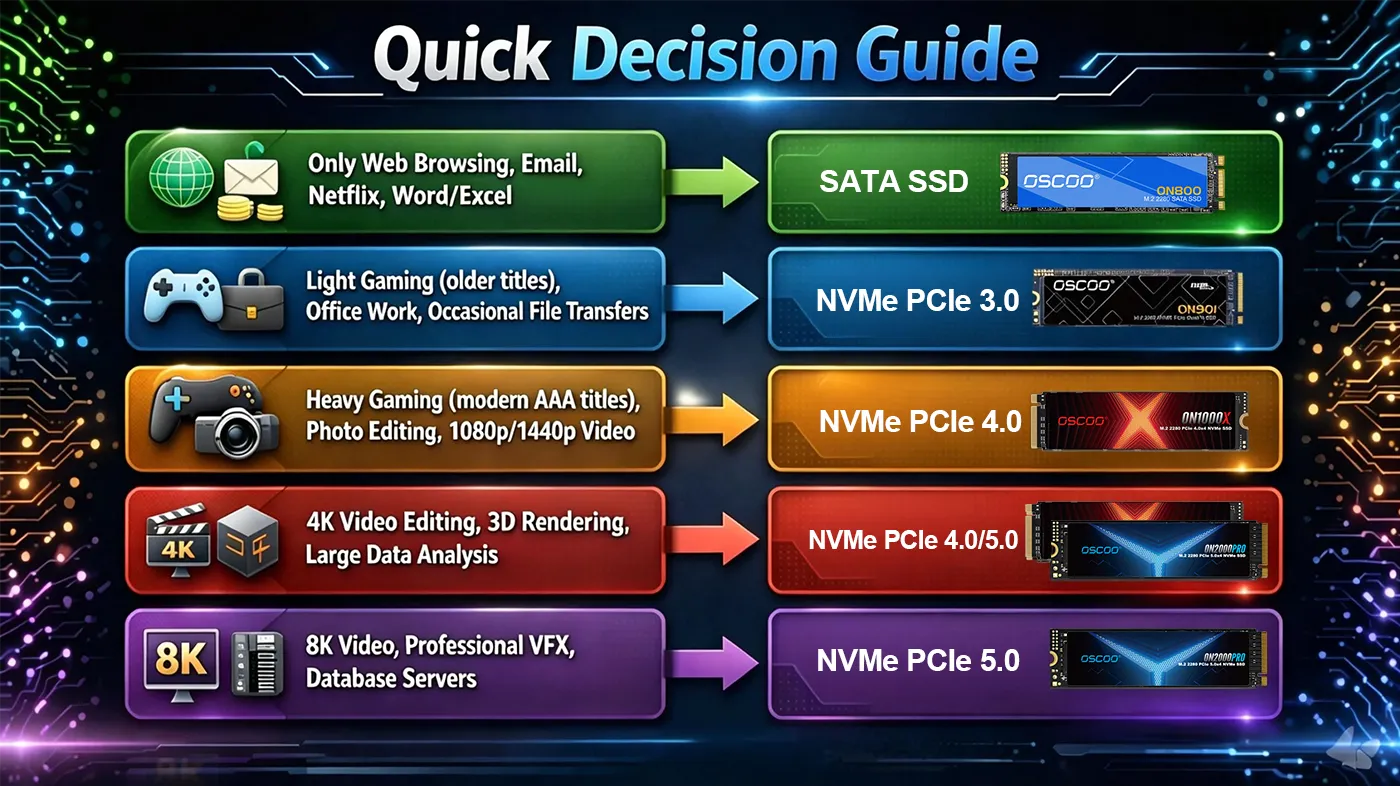
Il n'existe pas de vitesse d'écriture unique pour les disques SSD qui convienne à tout le monde. La vitesse d'écriture d'un disque SSD dépend en fait de votre utilisation quotidienne. Cependant, il existe une ligne directrice générale : Pour les tâches de base telles que la navigation sur le web et l'édition de documents, un disque SSD SATA avec une vitesse d'écriture séquentielle de plus de 500 MB/s est suffisant. Pour les jeux et la création de contenu, optez pour un disque NVMe PCIe 3.0 (2 500+ MB/s) ou PCIe 4.0 (4 000+ MB/s). Les professionnels qui font de l'édition vidéo 4K/8K ou du rendu 3D ont besoin d'un disque NVMe PCIe 4.0/5.0 avec une vitesse d'écriture soutenue de plus de 4 000 MB/s.
Pourquoi il n'existe pas de “bonne” vitesse d'écriture unique
Il est tentant de rechercher un chiffre unique définissant une “bonne” vitesse d'écriture sur un disque SSD, mais en réalité, il n'existe pas de réponse universelle. Ce qui est considéré comme “bon” dépend fortement de l'utilisation que vous faites de votre disque dur. SSD, et comment les différents types de performances d'écriture se comportent dans des scénarios réels.
Tout d'abord, les vitesses d'écriture ne sont pas toutes identiques. Performance du SSD est généralement mesurée de deux manières : la vitesse d'écriture séquentielle et la vitesse d'écriture aléatoire (4K). La vitesse séquentielle reflète la rapidité d'écriture de fichiers volumineux et continus, comme le transfert de vidéos ou la sauvegarde de données. Les performances en écriture aléatoire, mesurées en IOPS, La vitesse de traitement des petits fichiers détermine la rapidité avec laquelle ils sont traités, ce qui a une incidence directe sur la réactivité du système, le lancement des applications et le fonctionnement en mode multitâche. Ces deux mesures ayant des objectifs différents, un disque qui semble “rapide” sur le papier peut ne pas l'être au quotidien, et vice versa. Par exemple, une vitesse d'écriture séquentielle élevée n'améliorera pas significativement votre expérience si votre charge de travail consiste principalement à ouvrir des applications ou à naviguer sur le web.
Deuxièmement, les vitesses annoncées ne reflètent pas toujours les performances réelles soutenues. De nombreux disques SSD s'appuient sur la mémoire cache SLC pour augmenter les vitesses d'écriture maximales. Bien que cela fonctionne bien pour de courtes périodes, les performances peuvent chuter de manière significative une fois que le cache est épuisé, en particulier lors de transferts de fichiers volumineux. Cela signifie que deux disques SSD ayant des vitesses d'écriture “maximales” similaires peuvent se comporter de manière très différente dans le cadre d'une charge de travail continue.

Enfin, c'est votre charge de travail qui définit ce que signifie “bon”. Un utilisateur de base écrivant occasionnellement de petits fichiers ne bénéficiera pas de vitesses d'écriture très élevées, tandis qu'un éditeur vidéo travaillant avec de gros fichiers 4K ou 8K remarquera immédiatement la différence. En d'autres termes, la valeur de la vitesse d'écriture est relative et non absolue.
C'est pourquoi, au lieu de rechercher le chiffre le plus élevé, il est plus pratique d'adapter les performances des disques SSD à votre cas d'utilisation spécifique. La bonne question n'est pas “ Quelle est la meilleure vitesse d'écriture ? ”, mais “ Quelle vitesse d'écriture est adaptée à ce que je fais ? ”. Vous trouverez ci-dessous des recommandations de vitesse d'écriture basées sur des cas d'utilisation réels, afin que vous puissiez choisir le SSD qui correspond à votre vie, et non à celle de quelqu'un d'autre.
Vitesses d'écriture recommandées par cas d'utilisation
Pour une utilisation quotidienne de base
Pour une utilisation occasionnelle : consulter ses courriels, regarder Netflix en streaming ou travailler sur des documents Word, un SATA SSD avec une vitesse d'écriture séquentielle de plus de 500 MB/s est plus que suffisante. Vous remarquerez des temps de démarrage plus rapides (généralement inférieurs à 10 secondes) et des applications qui s'ouvrent instantanément. La vitesse d'écriture aléatoire 4K de 75 000+ IOPS garantit un fonctionnement multitâche fluide, comme l'ouverture simultanée de plusieurs onglets de navigateur et d'un document.
Pour les jeux
Les joueurs bénéficient de vitesses d'écriture plus rapides car elles réduisent les temps de chargement et éliminent l'apparition de textures. Les joueurs d'entrée de gamme peuvent s'en tenir à un SSD SATA, mais les joueurs de milieu et de haut de gamme devraient choisir un disque NVMe PCIe 3.0 avec une vitesse d'écriture séquentielle de plus de 2 500 MB/s et au moins 80 000 IOPS. Pour les jeux compatibles DirectStorage, qui exploitent des disques SSD plus rapides, un disque NVMe PCIe 4.0 avec plus de 4 000 MB/s offrira la meilleure expérience, réduisant les temps de chargement de 30 à 50% par rapport à SATA.
Pour la création de contenu
Les créateurs de contenu ont besoin de vitesses d'écriture constantes et rapides pour gérer les fichiers volumineux. Les éditeurs de photos travaillant avec des fichiers RAW remarqueront une différence avec une carte PCIe 3.0 NVMe avec une vitesse d'écriture séquentielle de plus de 2 500 MB/s, tandis que les éditeurs de vidéos 4K ont besoin d'une carte PCIe 4.0 NVMe avec une vitesse d'écriture soutenue de plus de 4 000 MB/s pour effectuer des montages en temps réel sans décalage. Pour les vidéos 8K ou le rendu 3D, un PCIe 5.0 NVMe avec plus de 10 000 MB/s est idéal, car il gère des tailles de fichiers massives sans perte de vitesse. Recherchez des disques avec des performances d'écriture soutenues élevées et une bonne conception thermique.
Pour les professionnels et les entreprises
Les professionnels qui utilisent des stations de travail pour la modélisation 3D ou l'analyse de données ont besoin de disques NVMe PCIe 4.0/5.0 avec une vitesse d'écriture séquentielle de plus de 4 000 MB/s et plus de 200 000 IOPS pour les écritures aléatoires. Les charges de travail d'entreprise (comme les bases de données ou le stockage en nuage) nécessitent des performances constantes et une endurance élevée. Il convient donc de rechercher des disques NVMe de classe entreprise avec des vitesses d'écriture soutenues de 4 000+ MB/s.
Comparaison de la vitesse des interfaces SSD
L'interface d'un SSD détermine sa vitesse d'écriture potentielle maximale. Voici un tableau simple qui montre les différences entre les interfaces courantes :
| Type d'interface | Vitesse d'écriture typique dans le monde réel | Meilleur pour |
|---|---|---|
| SATA III (6 Gbps) | 500-550 MB/s | Utilisation de base, anciens systèmes, stockage secondaire |
| NVMe PCIe 3.0 x4 | 2 000-3 500 MB/s | Jeux, édition de photos, disque principal |
| NVMe PCIe 4.0 x4 | 4 000-6 000 MB/s | Montage vidéo 4K, jeux vidéo haute performance |
| NVMe PCIe 5.0 x4 | 8 000-14 000 MB/s | Vidéo 8K, rendu 3D, utilisation en entreprise |
Remarque : les vitesses réelles varient en fonction du modèle ; les plages ci-dessus reflètent les moyennes réelles des disques durs les plus courants.
Facteurs affectant la vitesse d'écriture des disques SSD
Même si un disque SSD affiche des vitesses d'écriture élevées, les performances réelles peuvent varier. Voici les principaux facteurs qui influencent la vitesse d'écriture des données sur votre disque SSD.
- Technologie de cache. La plupart des disques SSD grand public utilisent un cache SLC, une partie du disque qui agit comme une mémoire tampon temporaire à grande vitesse. Cela permet d'augmenter les vitesses d'écriture maximales, mais une fois la mémoire cache remplie, la vitesse diminue. Pour les charges de travail importantes, il convient de rechercher des disques présentant des vitesses d'écriture soutenues élevées (et pas seulement des pointes) ou des conceptions utilisant un cache pSLC important ou une écriture directe TLC afin de maintenir des performances constantes.
- Type de flash NAND. Le type de Flash NAND affecte à la fois la vitesse et l'endurance. Le SLC est le plus rapide mais le plus cher, tandis que le TLC est le plus courant et offre un bon équilibre entre vitesse et coût. Le QLC est économique, mais il ralentit considérablement après l'épuisement du cache, ce qui en fait le meilleur choix pour une utilisation de base uniquement.
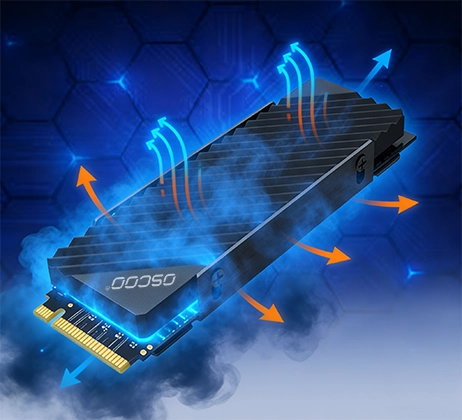
- L'étranglement thermique. Les disques NVMe rapides (PCIe 4.0/5.0) génèrent une chaleur importante. Si le disque surchauffe, souvent après 30 à 60 secondes d'écriture soutenue, il réduit les vitesses à des niveaux similaires à ceux de SATA pour se protéger. Pour les charges de travail soutenues, choisissez un disque doté d'un système de refroidissement intégré. dissipateur ou assurez-vous que votre carte mère dispose d'un système de refroidissement M.2 adéquat.
- Capacité d'entraînement. Les disques SSD de plus grande taille (1TB+) ont généralement des vitesses d'écriture plus élevées car ils utilisent plus de puces NAND, ce qui permet un traitement parallèle des données. Une version de 2 To du même modèle de disque SSD sera souvent 10-30% plus performante que la version de 1 To. Les disques plus petits (256 Go ou moins) peuvent avoir des vitesses d'écriture soutenues plus lentes, en particulier s'ils sont QLC.
Derniers conseils pour choisir le bon SSD
Ne vous compliquez pas la vie. Suivez ces conseils simples pour choisir un disque SSD dont la vitesse d'écriture vous convient :
Identifier votre charge de travail principale - Web/courriel ? Jeux/vidéo ?
Vérifier les vitesses d'écriture maximales et soutenues - Les spécifications marketing mettent l'accent sur les pics, mais les vitesses soutenues sont plus importantes pour une utilisation réelle.
Équilibrer la vitesse et le coût - Un disque SSD PCIe 4.0 est une solution intermédiaire idéale pour la plupart des utilisateurs, car il offre des performances à l'épreuve du temps sans se ruiner.
Prenons l'exemple de l'endurance (TBW) - Pour la plupart des utilisateurs, une capacité de 300 à 600 To est suffisante. Si vous exportez quotidiennement des vidéos volumineuses ou si vous exploitez des bases de données, optez pour un disque de plus de 1 200 To. Un TBW plus élevé est souvent synonyme d'un disque plus durable.
Ne pas ignorer le refroidissement - Pour les disques PCIe 4.0/5.0 utilisés dans des charges de travail soutenues, un dissipateur thermique est nécessaire dans la plupart des cas.