If you’ve owned a solid-state drive for a few years, you’ve probably noticed a common trend: brand-new Unidades SSD feel lightning-fast, but they can slow down slightly as you store, delete, and rewrite files over time. Unlike old mechanical hard disk drives (HDDs), SSDs rely on a special background process to stay functional and maintain consistent performance—and that process is garbage collection (GC). It’s a critical, built-in maintenance mechanism designed to counteract the unique physical limits of flash memory.
Why SSDs Need Garbage Collection
Mechanical hard drives (HDDs) use spinning platters and a moving read/write head, which lets them overwrite data directly in the exact spot where old data was stored—this is called in-place overwriting. When you delete a file on an HDD, the system marks that space as available, and new data can overwrite the old data immediately with no extra steps.
SSDs use Memoria flash NAND, a silent, non-mechanical storage chip with a physical limitation: they cannot perform in-place overwrites. Flash memory is organized into tiny fixed units, and old data must be fully erased before new data can be written to the same space. On top of that, deleting a file on a computer only tells the operating system to mark the space as “unused”—the actual old data stays on the flash chip as invalid, leftover garbage. Over time, this clogs up the SSD’s usable space and drags down performance. The table below simplifies the key storage differences between HDDs and SSDs to put this in perspective.
| Storage Feature | HDD | SSD |
|---|---|---|
| Overwrite Capability | Supports direct in-place overwrites | Cannot overwrite directly; requires full erasure first |
| File Deletion Behavior | Old data is replaced by new data automatically | Old data remains as invalid garbage; only marked as unused |
| Maintenance Need | No dedicated cleanup process required | Needs garbage collection to clear invalid data |
What Is SSD Garbage Collection?
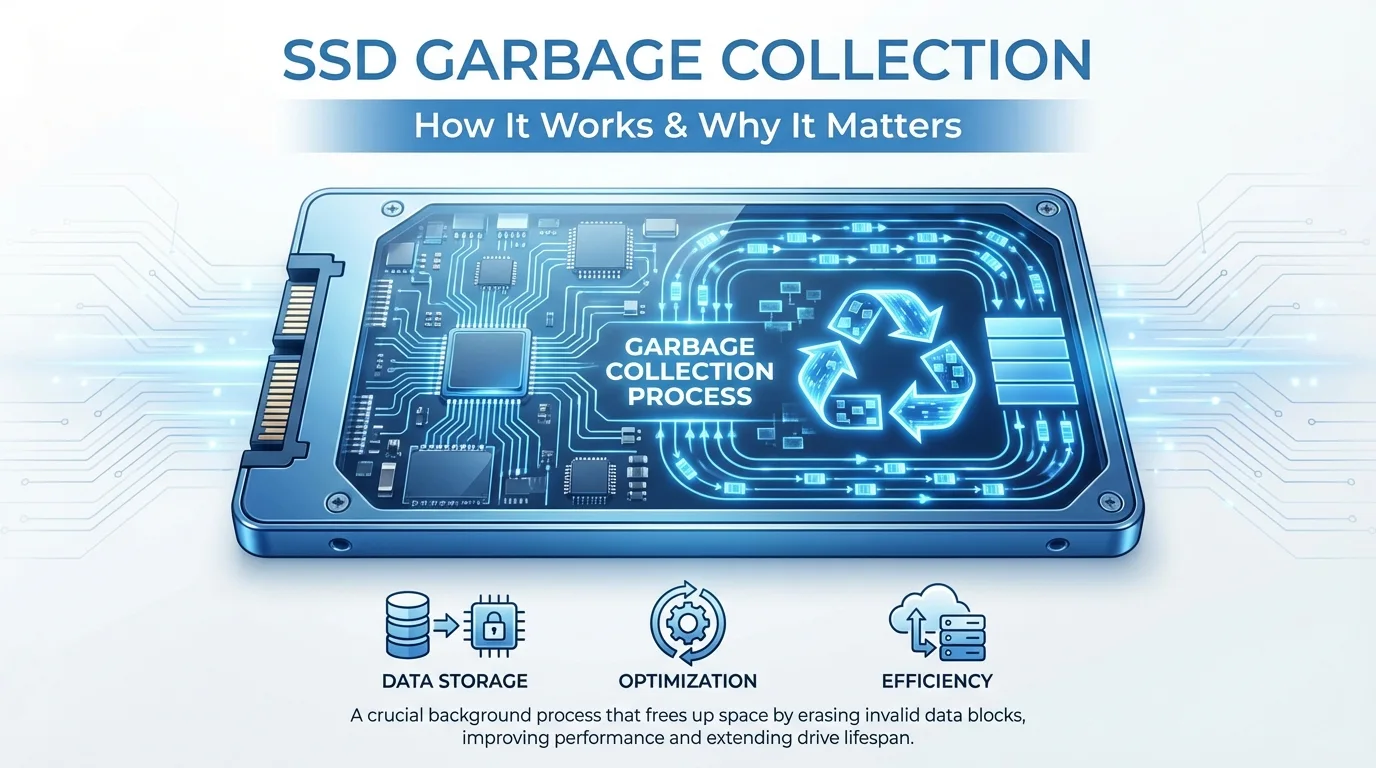
SSD garbage collection is an automated background process run by the SSD’s internal controller. Its job is to clean up invalid data (garbage) left by file deletions, overwrites, and system changes, reorganize fragmented flash memory space, and refresh usable storage blocks for new data writes.

Think of garbage collection as a dedicated housekeeper for your SSD. When you throw away “files” (delete data), the housekeeper doesn’t just leave the trash scattered around. It collects all the useless debris, moves any still-usable items to a clean area, wipes the messy space completely, and makes it ready for new use. Without this process, your SSD would quickly fill up with inaccessible garbage data, lose write speed, and have a drastically shortened lifespan.
How SSD Garbage Collection Works
There are two basic flash memory units in an SSD: Pages and Blocks. Pages are the smallest unit where the SSD reads and writes data, while Blocks are the smallest unit that can be erased. This mismatch is the reason garbage collection is necessary: you can’t erase a single invalid page. You have to erase the entire block it’s in.
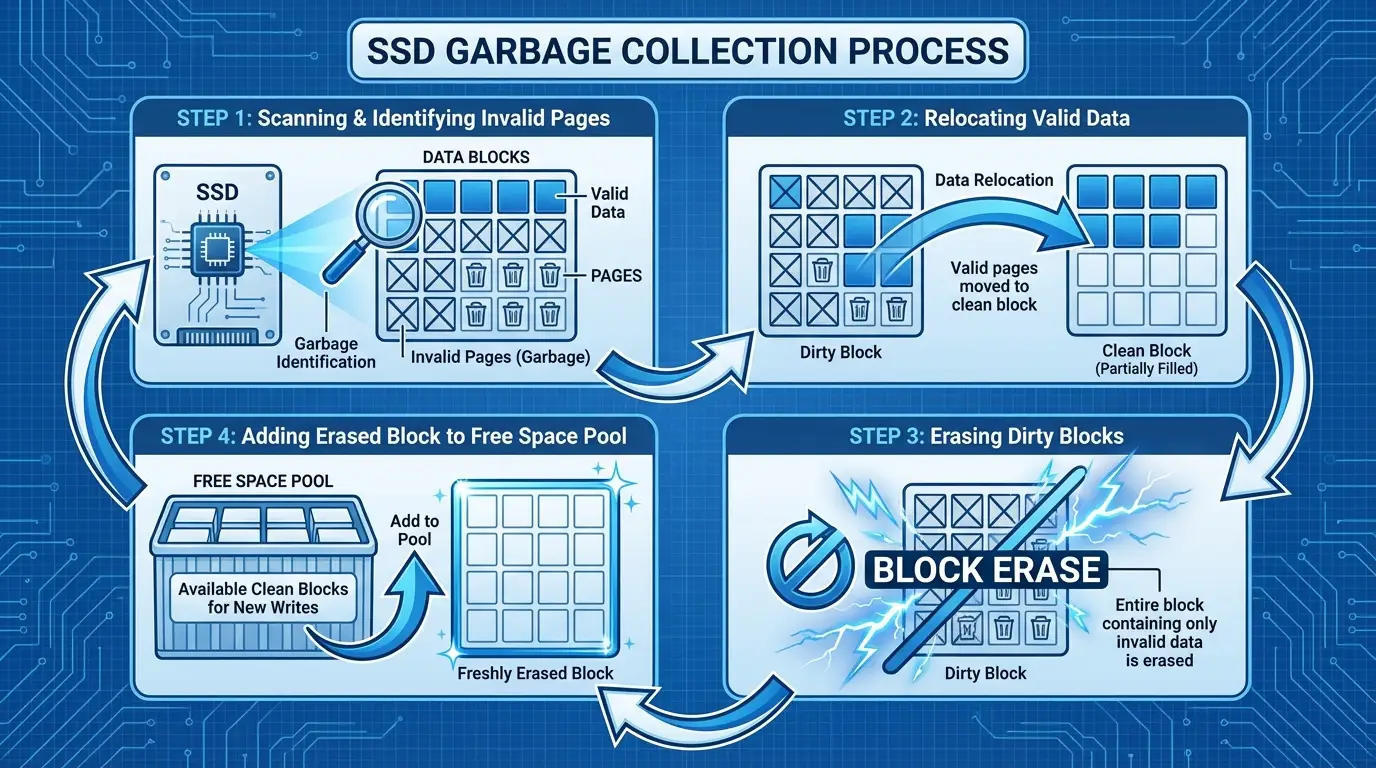
The garbage collection process follows four steady, automated steps:
- En Controlador SSD scans all storage blocks to identify pages marked as invalid by the operating system—these are pages holding deleted or overwritten data that no longer serves a purpose.
- The controller relocates all valid, still-usable data from these mixed (dirty) blocks to a completely empty, clean block. This step ensures no important data is lost during cleanup.
- When all valid data is safely moved, the controller erases the entire old dirty block, wiping all invalid garbage data permanently.
- The freshly erased block is added back to the SSD’s pool of free space, ready to store new data at full speed. This cycle repeats continuously in the background to keep the SSD optimized.
Two Modes of Garbage Collection
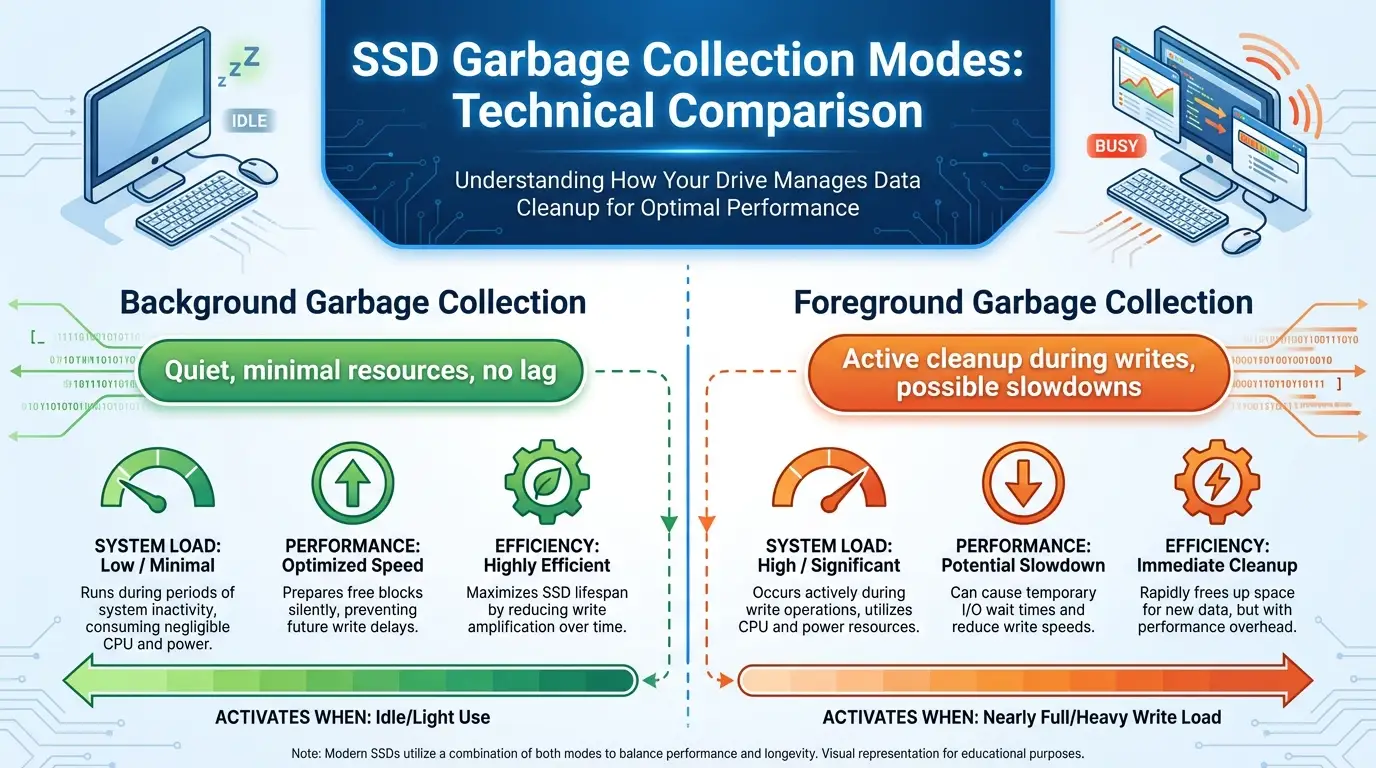
Garbage collection runs in two distinct modes, depending on the SSD’s current workload, and each mode impacts user experience differently. The mode is chosen automatically by the SSD controller, with no input needed from the user.
Background Garbage Collection is the standard, user-friendly mode that activates when the SSD is idle or under light use—such as when you’re browsing the web, typing a document, or leaving the computer idle. This mode operates quietly, using minimal controller resources, so it causes no noticeable lag or slowdown. It’s the ideal scenario, as it cleans up garbage without disrupting daily tasks.
Foreground Garbage Collection kicks in only when the SSD is nearly full or under heavy, continuous write load, like transferring large files, editing 4K video, or installing multiple programs at once. In this case, the controller has to run garbage collection while handling active read/write requests, which can cause temporary, mild slowdowns or latency spikes. High-quality SSD firmware is designed to minimize foreground garbage collection by prioritizing background cleanup whenever possible.
Garbage Collection and TRIM: A Critical Partnership
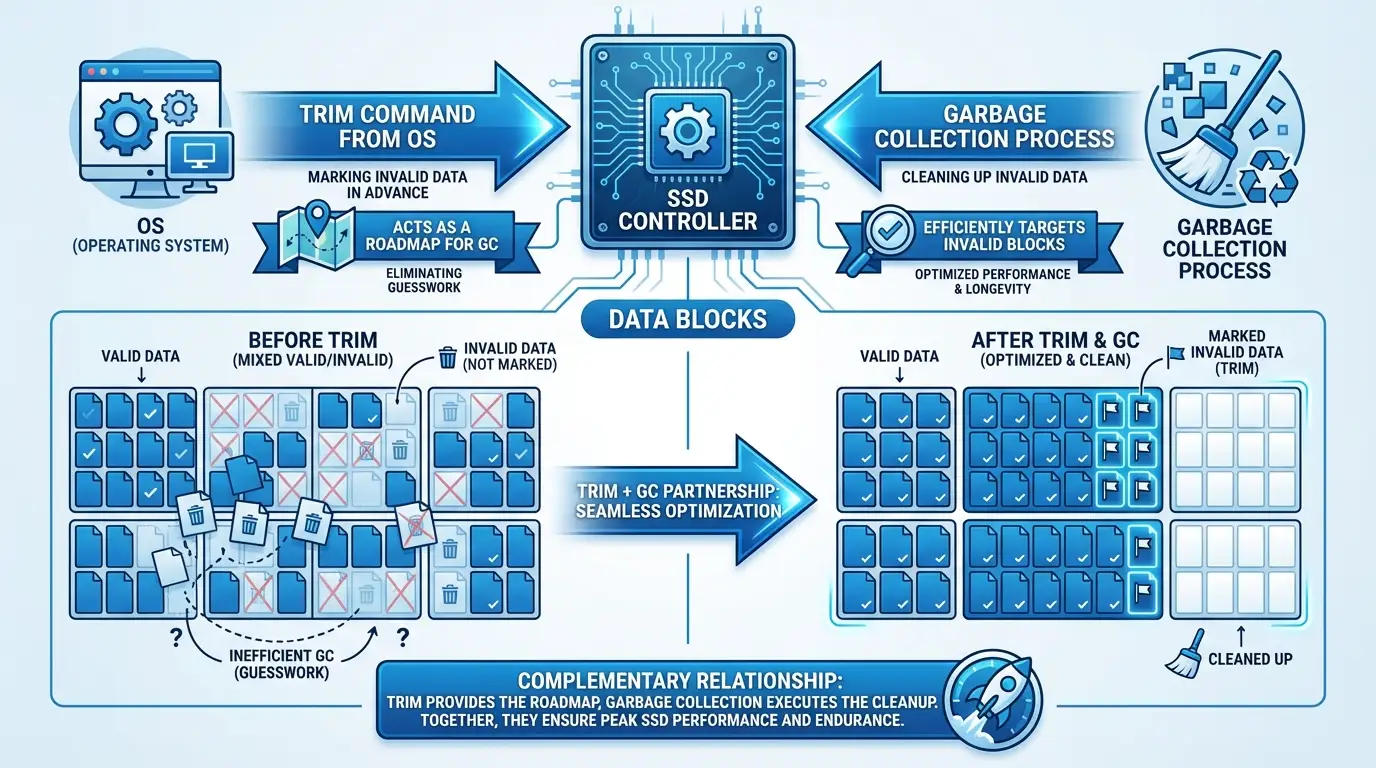
Garbage collection and TRIM are separate, complementary features that work together to keep SSDs running smoothly. TRIM is a command sent from the computer’s operating system to the SSD controller to tells the controller exactly which data blocks are no longer needed by the system, marking them as invalid in advance. Without TRIM, the SSD controller cannot tell valid and invalid data apart, so it has to relocate every page during garbage collection—this wastes resources, creates extra writes, and reduces efficiency. With TRIM enabled (the default on all modern operating systems like Windows 10/11 and macOS), garbage collection only targets truly invalid data, making the process faster, reducing wear on the flash memory, and preserving SSD performance long-term. TRIM acts as a “roadmap” for garbage collection, eliminating guesswork for the SSD controller.
Amplificación de escritura
Another key term tied to garbage collection is write amplification (WA), which refers to the ratio of actual data written to the flash memory versus the data the user intended to write. For example, if you save a 1GB file but the SSD writes 2GB of total data (due to relocating valid data during GC), the write amplification ratio is 2:1.
Garbage collection directly affects write amplification because relocating valid data creates extra, unavoidable writes. Higher write amplification means more frequent erasures and faster wear on the SSD, while lower write amplification means more efficient garbage collection and longer SSD lifespan. Well-optimized SSDs with enough free space keep write amplification low, which is why proper SSD maintenance matters more than most users realize.
Over-Provisioning: GC’s Dedicated Workspace
Over-provisioning (OP) is hidden, extra storage space reserved on every SSD by manufacturers, and it acts as the dedicated workspace for garbage collection. For example, a 1TB SSD typically has around 1.024TB or more of physical flash memory, with the extra space set aside exclusively for GC operations, data relocation, and firmware needs. This hidden space is critical for smooth garbage collection. More over-provisioning means more empty blocks for data relocation, which reduces foreground garbage collection and keeps write amplification low. Manufacturers set a baseline OP space for consumer SSDs, and users can preserve this efficiency by avoiding filling the SSD to 100% capacity.
Simple Tips to Optimize Garbage Collection Performance
You don’t need technical expertise to keep your SSD’s garbage collection running efficiently—small, consistent habits make a big difference.
- Always keep TRIM enabled. Modern operating systems enable it by default, but you can verify status through system settings if needed.
- Avoid filling your SSD to full capacity. Leave at least 10-20% free space at all times to give garbage collection enough room to operate in background mode.
- Minimize frequent, continuous small-file writes when possible, as these create more invalid pages and force more frequent GC cycles.
These steps take minimal effort but will keep your SSD fast and reliable for years.
SSD garbage collection is a smart, essential maintenance feature that makes modern solid-state drives practical and durable. It solves the unique limitations of NAND flash memory, ensuring your SSD maintains consistent speed and lasts through years of regular use. By taking a few simple steps to support garbage collection, you can maximize your SSD’s performance and lifespan without constant troubleshooting or technical tweaks.