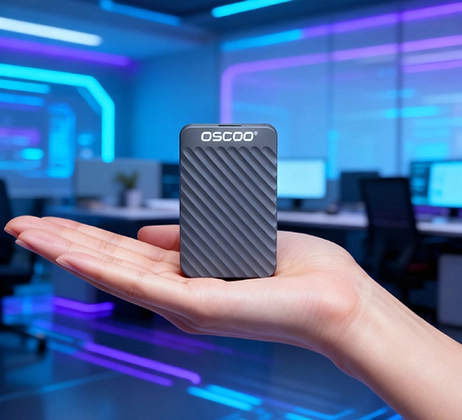
إذا كنت من المستهلكين البارعين في مجال التكنولوجيا الذين يبحثون عن حل تخزين محمول يجمع بين السرعة والراحة والاستقرار، فربما صادفت مصطلح "SSD المرفق المغناطيسي". على عكس التقليدية محركات أقراص الحالة الصلبة المحمولة (PSSDs) التي تعتمد على الكابلات وحدها للتوصيل والدعم، تضيف أقراص SSD ذات الملحقات المغناطيسية لمسة ذكية: مغناطيس مدمج يعلق بأجهزتك أو الأسطح المغناطيسية الحديدية بشكل آمن. هذا المزيج من أداء أقراص SSD والراحة المغناطيسية يحل نقاط الألم الشائعة لمستخدمي الأجهزة المحمولة. في هذه المقالة، سنقوم بتفصيل كل التفاصيل الرئيسية حول أقراص SSD المحمولة ذات الملحقات المغناطيسية.
ما هو SSD المرفق المغناطيسي SSD؟
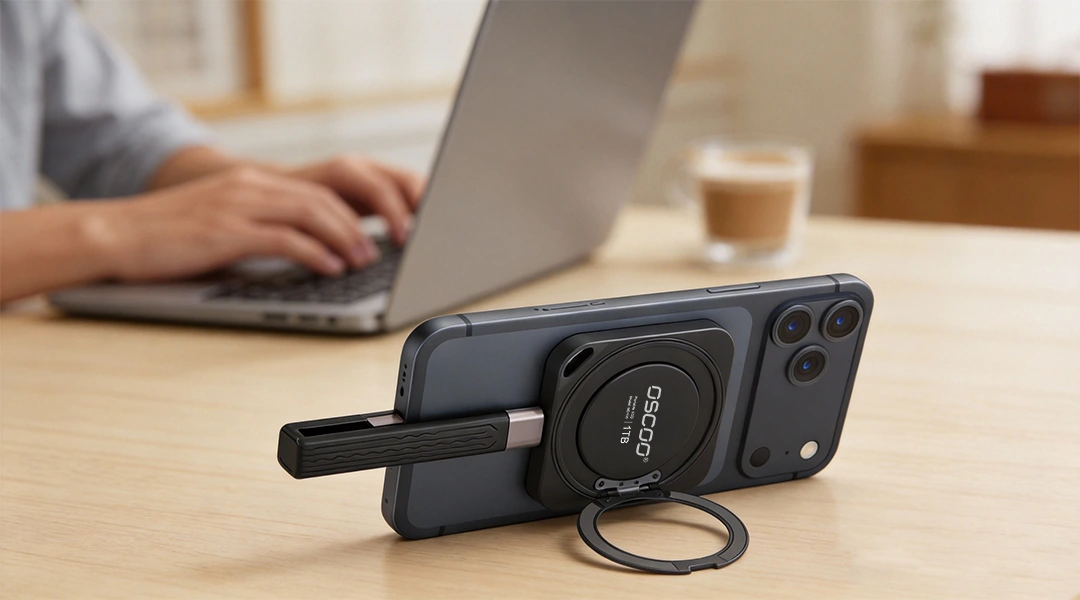
في جوهرها، فإن مرفق مغناطيسي SSD هو عبارة عن محرك أقراص محمول ذو حالة صلبة يدمج نظاماً مغناطيسياً مدمجاً مع تقنية SSD القياسية. فكر في الأمر على أنه محرك أقراص PSSD عادي مع إضافة "قبضة مغناطيسية": حيث يقوم المغناطيس بتثبيت محرك الأقراص بإحكام على الأجهزة المتوافقة (مثل أجهزة iPhone أو أجهزة الكمبيوتر المحمولة التي تدعم MagSafe) أو الأسطح المعدنية، بينما يتعامل كابل منفصل مع نقل البيانات عالي السرعة وتوصيل الطاقة. إن التثبيت المغناطيسي هو فقط من أجل الثبات المادي - فهو لا يؤثر على سرعة نقل البيانات أو موثوقيتها، وهو ما يظل مطابقاً لنقاط القوة الأساسية لمحرك أقراص الحالة الصلبة.

على عكس أجهزة التخزين اللاسلكية (التي تستخدم الواي فاي أو البلوتوث لنقل البيانات)، لا تزال أقراص التخزين ذات الحالة الثابتة المرفقة المغناطيسية تتطلب كابلًا ماديًا للبيانات - يكمن "سحرها" في التركيب الآمن بدون استخدام اليدين. وهذا ما يجعلها مثالية للمستخدمين الذين يحتاجون إلى تخزين سريع وموثوق به ولكنهم يريدون تجنب متاعب التحسس بالكابلات أو القلق بشأن انقطاع الاتصال العرضي أثناء الاستخدام.
كيف يعمل SSD المرفق المغناطيسي SSD؟
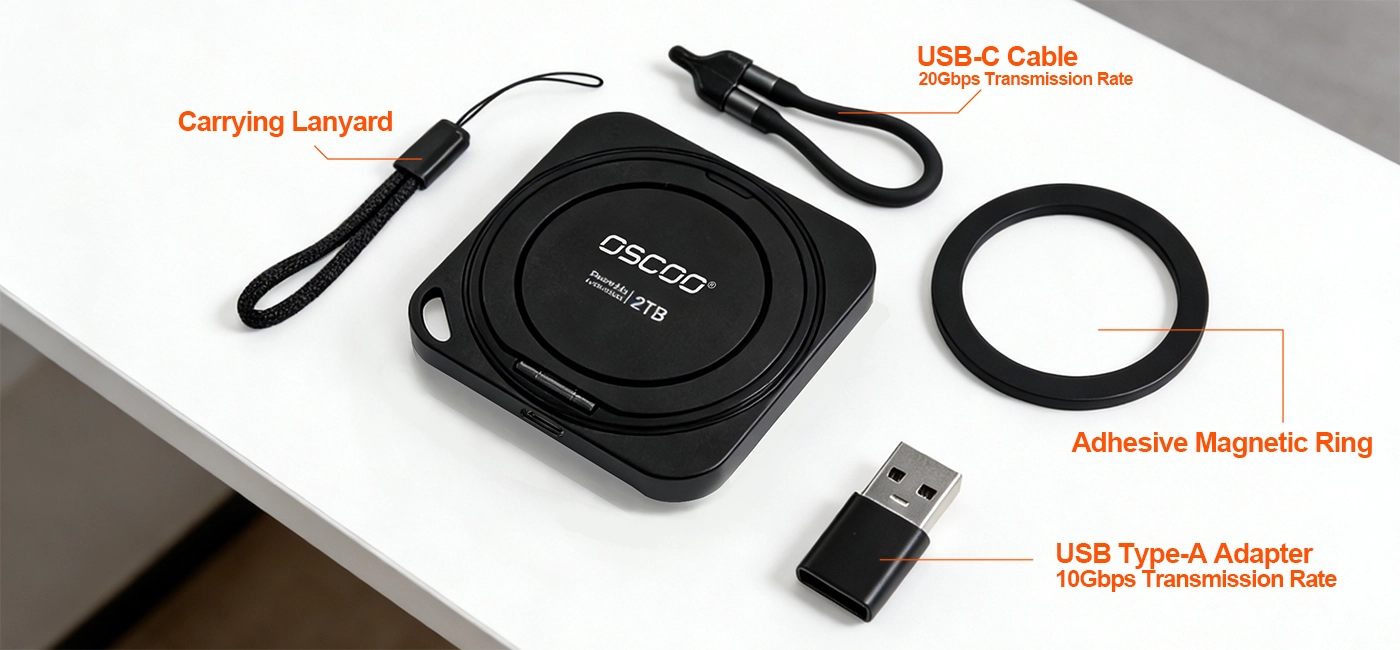
تعتمد وظيفة قرص SSD المرفق المغناطيسي على أربعة مكونات رئيسية، يعمل كل منها معًا لتوفير السرعة والراحة. فيما يلي تفصيل بسيط لكل جزء ودوره:
- SSD Core. الاستخدامات ذاكرة فلاش NAND (بدون أجزاء متحركة) لسرعات قراءة/كتابة سريعة ومقاومة للصدمات. هذه هي نفس التقنية الموجودة في أقراص PSSD القياسية لضمان الموثوقية والسرعة.
- النظام المغناطيسي. تستخدم عادةً مغناطيسات نيوديميوم عالية القوة من فئة N52 (مرتبة بنمط دائري) لالتصاق قوي (قوة سحب تتراوح بين 1.5 و2 كجم في المتوسط). معظم الطرازات الحديثة متوافقة مع MagSafe، وهي تتوافق مع معيار Apple المغناطيسي للتوصيل السلس بأجهزة iPhone 12+ وملحقات MagSafe.
- اتصال البيانات. يستخدم واجهات USB 3.2 Gen2 (10 جيجابت في الثانية) أو Gen2x2 (20 جيجابت في الثانية) أو Thunderbolt 3/4. وهي توفر نقلًا سريعًا للبيانات (10501 تيرابايت في الثانية إلى 37001 تيرابايت في الثانية)، وغالبًا ما تدعم توصيل الطاقة (PD) لشحن جهازك أثناء نقل الملفات.
- ملحقات اختيارية. غالبًا ما يتم تضمين الحلقات المغناطيسية (ألواح معدنية مع لاصق 3M) للأجهزة التي لا تحتوي على دعم مغناطيسي أصلي (مثل أجهزة iPhone القديمة أو هواتف Android أو أجهزة الكمبيوتر المحمولة غير المزودة بخاصية MagSafe). تتيح لك هذه الحلقات إضافة وظائف مغناطيسية إلى أي جهاز تقريباً.
من النقاط الأساسية التي يجب تذكرها: المرفق المغناطيسي ونقل البيانات منفصلان تمامًا. فالمغناطيس يثبّت محرك الأقراص في مكانه فقط، بينما يتعامل الكابل مع كل البيانات والطاقة. وهذا يعني أنك تحصل على أفضل ما في العالمين - تركيب مادي آمن ونقل بيانات سريع وموثوق.
الميزات التقنية الرئيسية
سيساعدك فهم هذه الميزات الرئيسية في مقارنة الطرازات واختيار الطراز المناسب لاحتياجاتك.

التقنية المغناطيسية
تستخدم معظم محركات أقراص الحالة الصلبة المرفقة المغناطيسية مغناطيسات النيوديميوم N52 درجة N52وهي من بين أقوى المغناطيسات الدائمة المتاحة. ويضمن ذلك بقاء محرك الأقراص متصلاً بإحكام حتى أثناء الحركة (على سبيل المثال، أثناء تسجيل الفيديو بهاتفك أو حمل الكمبيوتر المحمول). العديد من الموديلات أيضًا متوافق مع MagSafeمما يعني أنها تتماشى تمامًا مع نظام MagSafe من Apple - لا يوجد اختلال في المحاذاة أو ضعف في التثبيت.
قد تتميز الموديلات المتميزة بمغناطيسية ثنائية الجانب، مما يسمح لك بتوصيل محرك الأقراص بكل من جهازك وسطح مغناطيسي حديدي (مثل حامل ثلاثي القوائم معدني أو هيكل الكمبيوتر المحمول) لمزيد من التنوع. بالإضافة إلى ذلك، تقوم العلامات التجارية ذات السمعة الطيبة بحماية المغناطيس لمنع التداخل مع إلكترونيات جهازك أو البطاقات ذات الشرائط المغناطيسية (مثل بطاقات الائتمان) أو الأجهزة الطبية (مثل أجهزة تنظيم ضربات القلب).
مقاييس الأداء
الأداء هو المكان الذي تتألق فيه محركات أقراص الحالة الثابتة ذات الملحقات المغناطيسية حيث تحتفظ بكل سرعة وموثوقية محركات أقراص الحالة الثابتة القياسية. إليك ما يجب البحث عنه:
- سرعات القراءة/الكتابة: تتراوح من 1050MB/s (USB 3.2 Gen2) إلى 3700MB/s (Thunderbolt 4). بالنسبة لمعظم المستخدمين (على سبيل المثال، النسخ الاحتياطي للصور وتخزين المستندات)، فإن 1000-2000MB / ثانية أكثر من كافية. إذا كنت تعمل مع فيديو بدقة 4K/8K أو ملفات صور RAW كبيرة، فاختر طرازات Thunderbolt 4 (3000MBT/s+).
- خيارات السعة: تتوفر عادةً من 512 جيجابايت إلى 8 تيرابايت. الطرازات بسعة 1 تيرابايت و2 تيرابايت هي الأكثر شيوعًا - فهي توفر مساحة تخزين كافية لمعظم المستخدمين دون أن تكون باهظة الثمن. إذا كنت منشئ محتوى بملفات كبيرة، فقد يكون 4 تيرابايت فأكثر ضروريًا.
- توصيل الطاقة: تدعم العديد من الموديلات PD3.0 / PD3.1 (حتى 100 واط)، مما يتيح لك شحن الكمبيوتر المحمول أو الهاتف أو الكمبيوتر اللوحي أثناء نقل البيانات. هذه راحة كبيرة لمستخدمي الأجهزة المحمولة الذين يحتاجون إلى إبقاء أجهزتهم تعمل أثناء التنقل.
مزايا تفوق أقراص SSD المحمولة التقليدية المحمولة
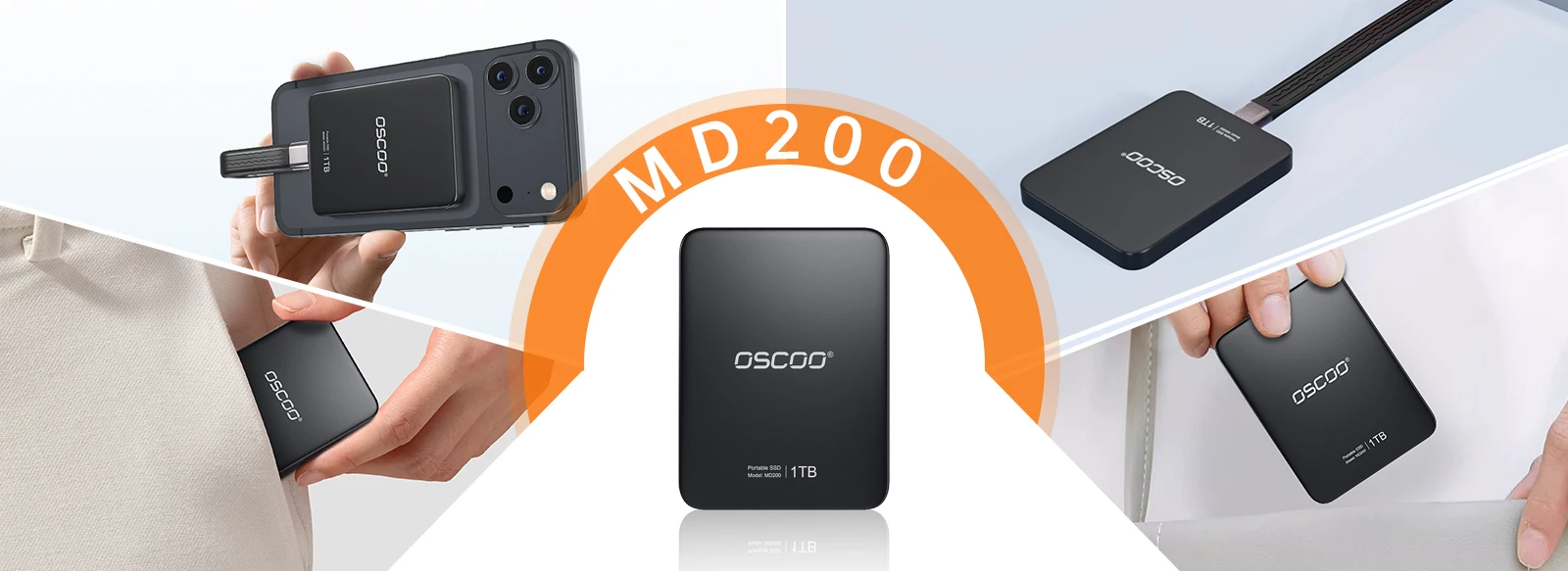
إن أكبر جاذبية لمحركات أقراص الحالة الثابتة ذات الملحقات المغناطيسية هي كيفية حلها للإحباطات الشائعة في أقراص الحالة الثابتة التقليدية. بالنسبة للمستخدمين الذين يقدرون الراحة والاستقرار، فإن هذه المزايا تغير قواعد اللعبة:
- التسجيل عبر الهاتف المحمول بدون استخدام اليدين. إذا كنت مدوّن فيديو أو صحفيًا متنقلًا أو صانع أفلام على الهاتف الذكي، فأنت تعرف معاناة حمل قرص PSSD أثناء تسجيل فيديو بدقة 4K (لتجاوز حدود التخزين في هاتفك). يتم تثبيت أقراص SSD ذات الملحقات المغناطيسية مباشرةً على هاتفك الذي يدعم MagSafe، مما يتيح لك التسجيل بدون استخدام اليدين دون الحاجة إلى حوامل أو أحزمة خارجية. هذا موفر كبير للوقت للتصوير في الموقع.
- تقليل التآكل والتلف. تتطلب محركات أقراص PSSD التقليدية توصيل وفصل متكرر، مما قد يؤدي إلى تآكل منفذ USB الخاص بجهازك بمرور الوقت. تعمل أقراص SSD ذات التوصيل المغناطيسي على تقليل هذا الإجهاد - بمجرد توصيل محرك الأقراص مغناطيسيًا، لن تحتاج إلى توصيل الكابل إلا مرة واحدة (أو تركه متصلاً). وهذا مفيد بشكل خاص للمستخدمين الذين ينقلون الملفات عدة مرات في اليوم (مثل المصورين ومحرري الفيديو).
- الارتباط والانفصال الفوري. ويعني تصميم "التثبيت والانطلاق" أنه يمكنك توصيل محرك الأقراص أو إزالته في ثوانٍ، دون العبث بالحافظات أو الأشرطة أو الوصلات الضيقة. وهذا مثالي للمستخدمين الذين يتنقلون بين الأجهزة في كثير من الأحيان (على سبيل المثال، استخدام محرك الأقراص ذي الحالة الصلبة نفسه للهاتف والكمبيوتر المحمول والكمبيوتر اللوحي).
- تركيب متعدد الاستخدامات. بفضل المغناطيس القوي، يمكنك توصيل محرك الأقراص بأي سطح مغناطيسي حديدي - هيكل الكمبيوتر المحمول أو الحوامل المعدنية أو حوامل السيارة أو حتى مكتبك. يحافظ ذلك على تنظيم مساحة العمل الخاصة بك وعلى سهولة الوصول إلى محرك الأقراص بدلاً من تشابك الكابلات على الأرض.
من الذي سيحتاج إلى مرفق مغناطيسي SSD؟
محركات أقراص SSD ذات الملحقات المغناطيسية ليست مناسبة للجميع - ولكنها مثالية لمجموعات مستخدمين محددة.
| مجموعة المستخدمين | هل هي مناسبة تماماً؟ | لماذا؟ |
|---|---|---|
| صانعو الأفلام/مدوّنو الفيديو عبر الهواتف الذكية | نعم | تسجيل 4K/8K بدون استخدام اليدين، وتجاوز حدود تخزين الهاتف، والتوصيل الآمن أثناء الحركة. |
| المصورون الفوتوغرافيون | نعم | نسخ احتياطي فوري لملفات RAW، وتقليل تآكل المنافذ، وتركيب متعدد الاستخدامات للعمل في الموقع. |
| المحترفون المتنقلون (العاملون عن بُعد) | نعم | توسعة تخزين سلسة لأجهزة الكمبيوتر المحمول/الأجهزة اللوحية وشحن PD والتوصيل السريع بين الأجهزة. |
| اللاعبون | ربما | تخزين سريع لمكتبات الألعاب، لكن المرفق المغناطيسي أقل فائدة لإعدادات الألعاب الثابتة. |
| المستخدمون العامون (النسخ الاحتياطي/التخزين الأساسي) | لا (إلا إذا كنت تقدر الراحة) | تعتبر أقراص PSSDs التقليدية أرخص ثمناً وتعمل بشكل جيد لتلبية الاحتياجات الأساسية - التثبيت المغناطيسي هو إضافة غير ضرورية. |
القيود التي يجب وضعها في الاعتبار
- توافق الجهاز. يعمل المرفق المغناطيسي بشكل أفضل مع الأجهزة التي تدعم MagSafe (أجهزة iPhone 12+، وأجهزة الكمبيوتر المحمولة MagSafe). أما بالنسبة للأجهزة التي لا تدعم MagSafe، فستحتاج إلى استخدام الحلقة المغناطيسية المضمنة - والتي تضيف طبقة صغيرة من الحجم وقد لا تكون مثالية للمستخدمين الذين يريدون مظهرًا أنيقًا.
- قيود الوزن. تزن معظم أقراص SSD ذات الملحقات المغناطيسية من 40-60 جرام، وهو وزن خفيف بما يكفي للتثبيت الآمن. ومع ذلك، قد لا تبقى الموديلات الأثقل وزناً (80 جراماً فأكثر) مثبتة بإحكام أثناء الحركة النشطة (على سبيل المثال، الجري بهاتفك)، لذا التزم بالخيارات الأخف وزناً إذا كنت بحاجة إلى قابلية النقل.
- مخاطر التداخل المغناطيسي. على الرغم من أن معظم الطرازات تحتوي على مغناطيسات محمية، إلا أن المغناطيسات القوية يمكن أن تتداخل مع الوسائط المغناطيسية (مثل بطاقات الائتمان وبطاقات الهوية) والأجهزة الطبية (مثل أجهزة تنظيم ضربات القلب). أبقِ محرك الأقراص على بعد 15 سم على الأقل بعيداً عن هذه العناصر لتجنب المشاكل.
- قسط السعر. تعد أقراص SSD ذات الملحقات المغناطيسية أغلى قليلاً من أقراص PSSD التقليدية ذات المواصفات المماثلة (عادةً ما تكون أقراص SSD ذات الملحقات المغناطيسية $20-$50 المميزة). إذا لم تكن بحاجة إلى الميزة المغناطيسية، يمكنك توفير المال باختيار قرص PSSD قياسي.
دليل الشراء: كيفية اختيار قرص SSD المرفق المغناطيسي المناسب
1. تحقق من توافق الجهاز الخاص بك. إذا كان لديك جهاز يدعم MagSafe (iPhone 12+، كمبيوتر محمول MagSafe)، فابحث عن أقراص SSD المتوافقة مع MagSafe لتوصيلها بسلاسة. إذا لم يكن الأمر كذلك، فتأكد من أن الطراز يتضمن حلقات مغناطيسية (معظمها يتضمنها) وأنك مرتاح لإضافة لوحة معدنية صغيرة إلى جهازك.
2. اختر السرعة بناءً على حالة الاستخدام الخاصة بك:
- الاستخدام الأساسي (الصور والمستندات): يكفي USB 3.2 Gen2 (10 جيجابت في الثانية، 1050MB/s).
- تحرير الفيديو بدقة 4K/صور 4K/صور RAW: USB 3.2 Gen2x2 (20 جيجابت في الثانية، 2000MB/s+) أو Thunderbolt 4 (3700MB/s+).
3. اختر السعة المناسبة:
- 512 جيجابايت: جيد للمستخدمين العاديين (النسخ الاحتياطي للصور ومقاطع الفيديو الصغيرة).
- 1 تيرابايت - 2 تيرابايت: الأفضل لمعظم المستخدمين (منشئو المحتوى، ومحترفو الأجهزة المحمولة).
- 4 تيرابايت فأكثر: مثالي لمنشئي المحتوى الاحترافيين (فيديو بدقة 4K/8K، ومكتبات RAW كبيرة).
4. النظر في الميزات الإضافية. ابحث عن الميزات التي تضيف قيمة لحالة استخدامك: شحن PD (لمستخدمي الأجهزة المحمولة)، أو المغناطيسية ثنائية الجانب (لتعدد الاستخدامات)، أو شاشة مدمجة (لمراقبة التخزين)، أو تتبع الجهاز.
تُعد محركات أقراص SSD ذات الملحقات المغناطيسية تطورًا ذكيًا للتخزين المحمول، حيث تمزج بين سرعة وموثوقية محركات أقراص الحالة الثابتة مع راحة التركيب المغناطيسي. إنها مثالية لمنشئي المحتوى والمحترفين المتنقلين وأي شخص يقدّر التخزين الآمن بدون استخدام اليدين أثناء التنقل. ومع ذلك، فهي ليست حلاً واحدًا يناسب الجميع - إذا كنت تحتاج فقط إلى تخزين النسخ الاحتياطي الأساسي، فإن أقراص PSSD التقليدية ستكون أرخص وفعالة بنفس القدر.
من خلال فهم الميزات الرئيسية والمزايا والقيود واحتياجاتك الخاصة، يمكنك اتخاذ قرار مستنير يناسب أسلوب حياتك وميزانيتك. سواء أكنت مدون فيديو تتطلع إلى تبسيط التسجيل عبر الهاتف المحمول أو مصورًا فوتوغرافيًا يحتاج إلى نسخ احتياطية فورية، فقد يكون قرص SSD المرفق المغناطيسي هو الترقية المثالية لإعداداتك التقنية.