For most people with basic to moderate tech needs, PCIe 5.0 M.2 SSDs are not worth the extra cost. They deliver impressive speed on paper, but the real-world benefit is minimal for everyday use like web browsing, office work, or even casual gaming. However, if you’re a professional content creator, AI developer, or tech enthusiast with a compatible system, the upgrade can be justified.
What Is a PCIe 5.0 M.2 SSD?
PCIe 5.0 محرك أقراص M.2 SSD is the latest generation of high-speed storage, using the PCIe 5.0 interface (Peripheral Component Interconnect Express Generation 5) and the compact M.2 form factor. The key improvement is bandwidth: PCIe 5.0 doubles the theoretical speed of its predecessor, PCIe 4.0, offering faster data transfer for large files and demanding tasks. Below is a quick comparison of PCIe generations for M.2 SSDs, focusing on real-world speeds that matter to users:
| توليد PCIe | Real-World Max Read Speed | Real-World Max Write Speed | حالة الاستخدام النموذجي |
|---|---|---|---|
| PCIe 3.0 | ~3,500 MB/s | ~3,000 MB/s | Casual use, older systems |
| PCIe 4.0 | ~7,400 MB/s | ~6,800 MB/s | Most users, gaming, moderate content creation |
| PCIe 5.0 | ~14,900 MB/s | ~14,000 MB/s | Professional work, high-end gaming, AI/ML |
To achieve the full speeds of PCIe 5.0, you need a compatible motherboard (with a PCIe 5.0 x4 M.2 slot) and CPU (e.g., Intel 12th Gen or newer, AMD Ryzen 7000 Series or newer). Without this support, the SSD will operate at slower PCIe 4.0 or 3.0 speeds, negating the value of the higher investment.

Why Most Users Don’t Need PCIe 5.0
The primary reason PCIe 5.0 isn’t worthwhile for most users is the marginal real-world improvement over PCIe 4.0. This is especially true when considering the significant cost premium. Let’s break this down:
- Everyday tasks like booting your OS, launching apps, browsing the web, or editing documents show almost no difference. A PCIe 4.0 SSD boots in 10-12 seconds, while a PCIe 5.0 might boot in 8-10 seconds—hardly noticeable. For casual gaming, load times are only 10-20% faster with PCIe 5.0, unless the game supports DirectStorage 1.2 (a newer tech that leverages high-speed storage). Even then, the difference is often just a few seconds.
- The price gap is significant. For most users, the extra speed isn’t worth the extra cost. There’s also a hidden cost: PCIe 5.0 SSDs generate considerably more heat (reaching up to 95°C under heavy loads), which often necessitates premium heatsinks or active cooling to prevent thermal throttling and the associated performance drops.
- Compatibility is a barrier. If your system is more than 2-3 years old (pre-2022), it likely doesn’t support PCIe 5.0. Even some newer laptops lack the cooling or power to run PCIe 5.0 at full speed, making the upgrade pointless.
Who Should Buy a PCIe 5.0 M.2 SSD?
While PCIe 5.0 isn’t for everyone, it’s a worthwhile investment for specific users who rely on high-speed storage for their work or hobbies. These include:
- Professional Content Creators: If you edit 4K/8K video, work with large 3D models, or transfer massive project files (100GB+), PCIe 5.0’s speed cuts down on waiting time. For example, rendering an 8K video or scrubbing through high-resolution footage can be 40-50% faster with PCIe 5.0 compared to PCIe 4.0.
- AI Developers & Data Scientists: Training AI models or working with large datasets requires fast read/write speeds to process data quickly. PCIe 5.0’s high IOPS (input/output operations per second—over 2.3 million) makes these tasks more efficient.
- Tech Enthusiasts & High-End Gamers: If you’re building a future-proof PC (planned to last 3-5 years) or want the absolute best performance for benchmarking, PCIe 5.0 is a good choice. Gamers with DirectStorage 1.2-compatible systems will also notice faster load times for large open-world games.
- Workstation Users: Those running multiple virtual machines, database servers, or intensive software (like CAD/CAM) will benefit from PCIe 5.0’s enhanced multitasking capabilities.
Key Things to Check Before Buying
If you’re considering a PCIe 5.0 M.2 SSD, make sure to verify these three things to avoid wasting money:
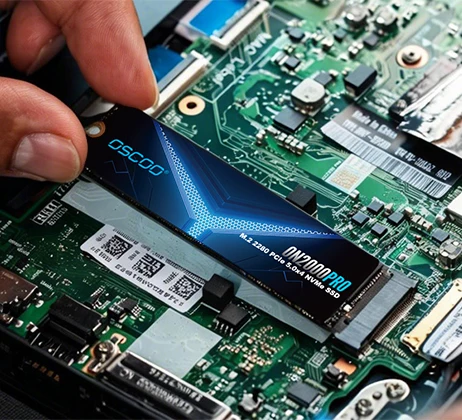
- System Compatibility: Check your motherboard’s specs to confirm it has a PCIe 5.0 x4 M.2 slot. You’ll also need a CPU that supports PCIe 5.0 (Intel 12th Gen+/AMD Ryzen 7000+). If you’re unsure, use your motherboard model to look up compatibility online.
- التبريد: Ensure your system has enough space for the SSD’s heatsink (PCIe 5.0 SSDs often have larger heatsinks) or that your motherboard includes a built-in heatsink. Without proper cooling, the SSD will throttle, and you won’t get the full speed you paid for.
- Budget vs. Need: Ask yourself if you actually need the extra speed. If you’re only using your PC for everyday tasks, a PCIe 4.0 SSD offers 90% of the performance at half the cost. Save the premium for PCIe 5.0 only if your workload demands it.
PCIe 5.0 M.2 SSDs are an impressive piece of technology, but they’re not a one-size-fits-all upgrade. For most users, PCIe 4.0 is the better choice—it’s affordable, fast enough for almost all tasks, and avoids the thermal and compatibility headaches of PCIe 5.0. For professionals and enthusiasts with compatible systems and demanding workloads, PCIe 5.0 is worth the investment, as it saves time and future-proofs your PC. Ultimately, the decision boils down to your specific needs and budget.